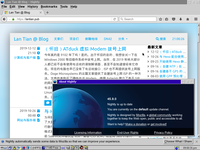
OS/2 is an operating system initially developed by IBM and Microsoft and later maintained by IBM. Back in the 1990s, OS/2 was a competitive rival to Windows, but later OS/2 was defeated by the Windows series, and IBM finally shut down OS/2 Warp 4's tech support on Dec 31, 2006. But this does not mark the death of OS/2. After official tech support ended, Senerity System took over OS/2's development and continued it under the name eComStation. In 2015, another company, Arca Noae LLC, produced an OS/2 based distribution called ArcaOS, and sold it as a commercial product. At the same time, the open-source community is providing some support to OS/2. They cross-compiled common Unix tools (including ls , rm , etc.), RPM/YUM package manager, and a series of libraries on OS/2....
(Nostalgia) ATduck Virtual Modem Dial-up Internet
Is this really the year 2019? Yes. For nostalgic purposes, I wanted to try dial-up internet on legacy operating systems like Windows 2000. Of course, in 2019, most people no longer use telephone line modems, and many might not even know they ever existed. Modern computers no longer have telephone line interfaces, and ISPs no longer provide dial-up services. This article by Doge Microsystems describes a method for self-hosting a dial-up ISP. The author purchased a hardware telephone modem, used Asterisk to build a SIP-based VoIP network, and then connected the modem to the network using an Analog Telephone Adapter (ATA). The author also used mgetty on Linux to operate the modem and combined it with pppd to provide a PPP dial-up service. The main issues with this approach are:...
Using Sass and Webpack with Hexo
Why Use Sass and Webpack Sass is a superset of CSS that extends CSS syntax with numerous features, including rule nesting, variable definition, includes, and mathematical operations. Key functionalities can be explored in the Official Getting Started Guide . Sass originally used the .sass file extension with a YAML-like structure that wasn't fully compatible with traditional CSS. The current Sass format (.scss) maintains full CSS compatibility. I use Sass for two primary reasons: First, for clearer CSS rule management. For example, when I have CSS rules that only apply to the website header, I can group them within a single block: header { h1 { ... } } Second, to reduce CSS file size during page loading. Although my site uses Bootstrap,...
Getting Started with the Hexo Static Site Generator
What is a Static Site Generator Common CMS platforms like WordPress and Typecho are dynamic websites. When users access a webpage, the server runs programs written in languages like PHP, Python, or Node.js to dynamically generate the webpage in real-time based on the user's request and returns it to the user. Static site generators like Jekyll, Hexo, and Hugo take a different approach: they pre-generate HTML files in advance to match anticipated user requests. The main advantages and disadvantages of these two approaches are as follows: Advantage Dynamic Website Static Website Dynamic Supports complex interactions and content updates based on user input Limited flexibility,...
(Self-built NTP) Using PPS on Tinker Board
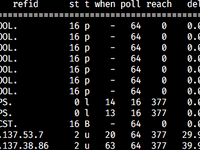
In the previous article , I built a self-hosted NTP server using Tinker Board and an ATGM336H GPS/BeiDou module, with GPS as the time reference. In addition to the traditional serial output of NMEA sentences, the GPS module also provides a PPS signal that changes once per second. Originally, gpsd needed to continuously parse NMEA sentences from the GPS module, which took considerable time and was prone to being preempted by other processes, causing delay and jitter. The PPS signal, however, can directly trigger a CPU interrupt to run a simple handler at high priority, unaffected by other programs. Typically, Linux kernel provides native driver support for PPS. But in the previous setup, since Armbian Linux kernel on Tinker Board lacked PPS support, we couldn't enable it directly....
Building a GPS-based NTP Server
What is NTP NTP (Network Time Protocol) is the most widely used internet time synchronization protocol. Common operating systems like Windows, macOS, and Linux come with built-in NTP clients that connect to remote servers to obtain the current time. For example, Windows' Internet time synchronization feature is based on NTP: (Image source: Internet) By default, Windows connects to time.windows.com , an NTP server maintained by Microsoft. However, this server performs poorly in mainland China. Located in the US, it suffers from high and unstable latency, making it difficult for NTP clients to obtain accurate time. Are there NTP servers in mainland China? Yes, but not many: cn.pool.ntp.org An NTP server pool project maintained by www.pool.ntp.org , with servers provided by volunteers....
Using GPP to Preprocess Dockerfile for #include, #if, and Other Features
Since I have multiple devices with different architectures running Docker (including x86_64 computers and servers, ARM32v7 Tinker Board, and ARM64v8 Raspberry Pi 3B), each of my Docker images needs to be built in multiple versions. Initially, I wrote a separate Dockerfile for each architecture , but this approach proved difficult to manage uniformly, often leading to missed updates when modifying Dockerfiles during software upgrades. Later, I adopted Docker's build argument feature , using the --build-arg parameter to select different base images and download architecture-specific files based on arguments. However, this approach still has significant limitations. First, different projects use varying naming conventions for architectures. For example, the x86 32-bit architecture (i386)...
Cyclone IV FPGA Development Log
Last semester, the school offered a digital systems course, which involves development on FPGAs. At the end of the course, we need to gather in groups and achieve some complicated functionality with the flexible architecture of FPGA, such as creating a game or running a convoluted neural network. We are free to add extra functionalities as we wish. Our group has done a game similar to Raiden, or controlling a fighter jet and attacking enemies with bullets. In addition to course requirements, we implemented these extra functionalities: A 640x480 VGA framebuffer with 16-bit color depth, stored on SRAM chip Naturally, Simplified Chinese fonts are included (full UTF-8 Chinese range, but without punctuation marks, since they are out of that range and we're kinda lazy)...
Running Anycast DNS with Docker in DN42
2020-03-16 Notes There is an updated scheme compared to this post, see Sharing Network Namespace Among Docker Containers for Bird Anycasting . It is suggested to read only the concept explanations in this post, and use the above scheme instead for deployment. What's Anycast The commonly used routing protocol on Internet, the BGP, works like this: I own an IP range, 172.22.76.104/29, on DN42. With a BGP software like BIRD, I "announce" that my server has access to IP range 172.22.76.104/29. Servers with peering to me will record this message: "Over this path, I can access 172.22.76.104/29 which is 1 step away." These servers continue to announce to others with peering to them: "This server is 1 step away from the source of 172.22.76.104/29." Similarly,...
Typecho Theme Performance Optimization and Caching
To implement features like Lightbox and code highlighting, I added post-processing code to my blog theme that performs an additional layer of processing on the HTML output after Typecho's Markdown conversion. However, due to the large number of historical articles on my blog and my use of different editors over time (WordPress editor, Baidu UEditor, etc.), my processing logic became quite complex to ensure compatibility with older articles. Combined with the limited performance of my budget VPS, this resulted in longer webpage loading times. I added the following line to my nginx configuration to output server-side processing time in HTTP headers: add_header LT-Latency $request_time ; Initially, this value was around 0.25, meaning each page took about 250ms to process on the server....