Preface
On the night of 2026-10-14, I suddenly got an alarm from Alertmanager about persistent high CPU usage on one of my servers:
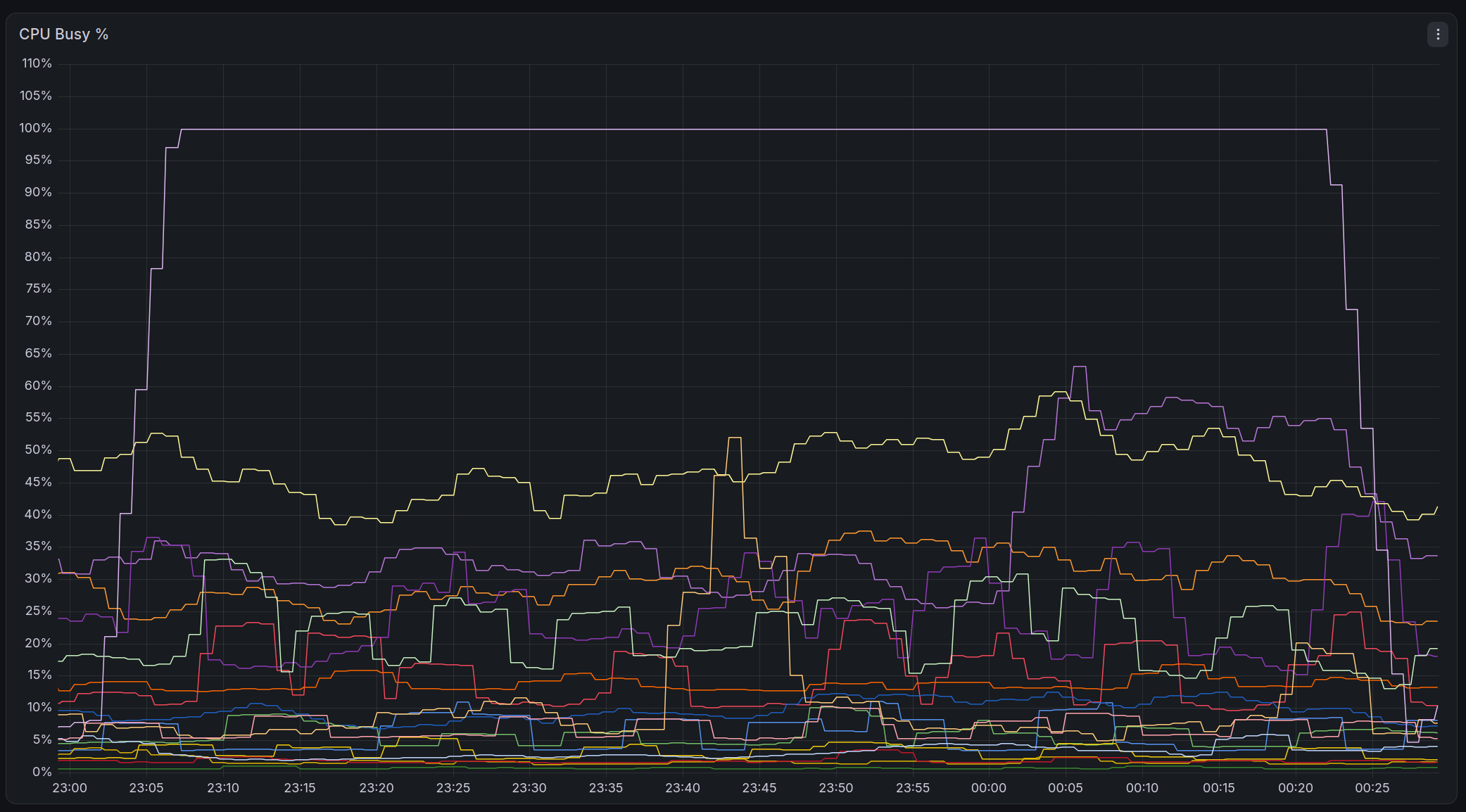
That's weird, as that server doesn't run any services that is expected to have continuous CPU usage. Then, when I logged on to the server to check what's going on, I indeed found a process, python3 -, consuming all the CPU.
The dash sign - in python3 - means the Python process will read the code it's supposed to execute from standard input. However, I always save the code as a .py file before running it, and had never run any code like that. Nevertheless, if you have used AI/LLM agents before, you might have noticed that python3 - is a characteristic of AI agents, as they love to run code in the following way:
# Input command
$ python3 - <<EOF
print("hello world")
EOF

# Output
hello world
The problem is, I'm also not running any AI agents at that time, let alone letting them operate on my server. Intrigued, I checked the logs of that server, and was immediately greeted with 434 successful SSH login attempts, coming from an IP address in Heilongjiang province, China that I do not recognize, yet used the exact same SSH key as the one I use every day.
AH F**K
After a bunch of commands, I temporarily rotated my SSH keys and shut down all externally facing services, and managed to stop the attacker. By analyzing logs, I realized that the attacker moved horizontally through the mesh VPN I previously set up between hosts, and logged in to 12 of my servers in total.
Info
Theoretically, the best way to handle a cyberattack is to disconnect the server from the network without shutting it down, which will stop the attacker while retaining as much evidence as possible, and allow further forensic analysis. However, I panicked at that time, and didn't realize that I can shut down network access with something like ip link set eth0 down.
After backing up and reinstalling OS on every server, ensuring that the servers are safe, and resetting any credentials the attacker might have stolen, I was busy for the next few days analyzing logs from all the servers:
- The attacker definitely used AI agents. After all, a human will never login via SSH 434 times in a row. Only AI agents, which cannot maintain a long SSH connection, will do this.
- The attacker didn't appear to do any damage other than logging in and searching for secrets. No files were changed abnormally across any of the servers, and no rootkits were found. All the logs from each of the servers are complete, and they do match the content on my Loki central log collector. This means that either the attacker is such a genius, who can tamper with my data while leaving absolutely no traces, or the attacker never planned to do any damage.
- One of my servers is providing a Nix binary cache for Linux kernels with CachyOS patches, which is definitely a juicy target. However, that server only had 5 very short SSH logins, indicating that it isn't the primary target of the attacker.
However, the log also didn't record how the attacker got my SSH key:
- The attacker previously spent hours probing my Internet-exposed services, leaving a ton of nginx logs, however none of that probing was successful. But after staying dormant for an hour, the attacker suddenly successfully logged in with my SSH key, without any abnormal logs in between.
- I have been using this SSH key for almost 10 years, and it's certainly possible that I leaked it through other means. However, I still cannot rule out the possibility of a vulnerability or config error in one of my services.
- Despite checking all services both manually and through AI agent assisted penetration tests, and fixing some issues, I still cannot identify any signs of attacks in these logs.
Therefore, although I have reinstalled OS on every server, and am sure that the servers are secure now, I'm not sure that the attacker won't be able to come back through the same path. I can only assume: under the worst situations, there is a vulnerable externally facing service, that can be exploited any time by attackers to gain the same access as the service itself, such as via Remote Code Execution, but I do not know which service it is.
In addition, this is probably the worst October/November in cybersecurity history. Several critical vulnerabilities were discovered, including CVE-2026-98432 Linux IPv4 stack vulnerability, CVE-2026-109618/109619 PHP RCE, CVE-2026-123007 Nginx RCE. Even if my services appear to be secure today, there might be a vulnerability tomorrow, which can be used to attack me before I patch or shutdown the service.
Under this premise, I need to harden all externally accessible services, so that even if attackers gain remote code execution through these services, it's difficult for them to gain more privileges or access more secrets, to contain the damage from the attack. Therefore, I turned my attention to the hardening options provided by systemd.
Info
AI/LLM disclaimer: I used AI assistance when implementing the Nix logics below, to quickly fix issues and restore services as soon as possible. I have manually checked all logics implemented by AI, and am sure that if I were to implement everything myself, I would have done it in the same or equivalent way.
This post itself is written entirely by human, without any AI assistance.
systemd: Containerization Without Containers
The Linux kernel itself offers a lot of features related to hardening or permission management, such as Capabilities for gating access to privileged operations of programs, Namespace for isolated per-process settings on cgroup, network, filesystem mount, and users, as well as Seccomp limiting system calls a process has access to.
Container tools like Docker are essentially built on top of these hardening features, just in an unique way. They will create a namespace for each container, mount filesystems for the container into that namespace, set up its networking and user permissions, so that every container can run independently, while staying invisible (at least not directly) to each other, and without any interference. These container tools will also use cgroup and seccomp to limit permissions of each container, to prevent processes in the container from gaining privileges on the host. These isolation measures enabled the rise of some container cloud services, which runs containers from different customers on the same host, without worrying that malicious customers launch an attacker from their container, and gain access to other customer's containers.
The systemd service manager, used by lots of popular Linux distros today, also provides tons of hardening options based on these features. You can still achieve some degrees of isolation, such as limiting privileges of services, even without using containers, which will reduce the amount of damage in case of cyberattak.
Preventing Gaining Root
Let's assume we have a simple program that provides a HTTP service externally:
[Unit]
After=network.target

[Service]
Type=simple
ExecStart=/path/to/my-http-service --listen 0.0.0.0 --port 12345 --root /var/www/my-site

[Install]
WantedBy=multi-user.target
By default, the service will run with the root user, and without any restrictions at all. This means that if the service is vulnerable so that an attacker can achieve Remote Code Execution, the attacker will instantly get root access, and be able to do anything they want. The entire machine is immediately in the hands of the attacker, which is clearly very dangerous.
We can do some basic restrictions, such as creating a separate user for the service, and not giving it sudo access, so that it can only access files it has permissions to:
[Unit]
After=network.target

[Service]
Type=simple
ExecStart=/path/to/my-http-service --listen 0.0.0.0 --port 12345 --root /var/www/my-site
User=my-http-service
Group=my-http-service

[Install]
WantedBy=multi-user.target
Now, the attacker would only get access to the my-http-service user, which prevents further damage... Or is it? The attacker could still have tried the sudo command, and gain root access through vulnerabilities like CVE-2025-32463 or CVE-2021-3156.
Instead of worrying about possible vulnerabilities of sudo, we can use systemd to prevent the service from gaining sudo access at all:
# Omitted other parts
[Service]
NoNewPrivileges=yes
Linux kernel offers the setuid mechanism, which allows marking a program so that no matter which user executed it, the program will run as the same user who owns the program. On most common Linux systems, the sudo program is installed by the system administrator, so sudo is owned by the root user. Then, sudo can make use of the setuid mechanism to gain root access temporarily, so that after checking the user's permissions, it can run the command as root (or other users).
However, the NoNewsPrivileges option of systemd flags the process so that, even if it tries to run setuid programs like sudo, the setuid marker is ignored, and sudo will fail since it's not getting root permission it expects.
In addition to setuid, the Capabilities mechanism of Linux kernel can also achieve similar goals. System admins can mark programs to gain extra "capabilities" automatically when executed, such as CAP_SYS_ADMIN, which is very close to root access. To prevent our service from being used to run programs with capability markers, we can add these two options:
# Omitted other parts
[Service]
AmbientCapabilities=
CapabilityBoundingSet=
AmbientCapabilities controls the capabilities that the service itself gets, and CapabilityBoundingSet controls how much permission other programs can get if they are executed by the service. Here, both of them are set to empty, which means the service has no extra capabilities at all, nor any programs started by it. This achieves the same effect as NoNewPrivileges on the Capabilities subsystem.
Preventing Arbitrary Reading/Writing
Now the attacker cannot gain root privileges anymore, but even as a normal user, the attacker can still read/write files on the system, as long as they have the correct permissions. For example, if another file or folder is set to mode 777, the attacker can then tamper with it, affecting other services on the same host. Worse, if the file is a program, the attacker can plant a backdoor in it, then wait for other unsuspecting users or even the administrator to run it, and gain further access.
To prevent this, systemd provides a bunch of filesystem related hardening options:
# Omitted other parts
[Service]
# Only keep most basic devices in /dev (e.g. /dev/null, /dev/urandom), do not expose actual devices like /dev/sda
PrivateDevices=yes

# Create a new namespace and mount needed files into it on demand, just like a container. Is the basis for all other options here
PrivateMounts=yes

# Mount an isolated /tmp (and /var/tmp) folder, so it can't access other service's temp files
PrivateTmp=yes

# Only keep process-related entries in /proc (/proc/[number]), excluding those that expose system and kernel state, such as /proc/mounts
ProcSubset=pid

# Prevent service from changing system time
ProtectClock=yes

# Prevent service from changing cgroup related settings
ProtectControlGroups=yes

# Prevent service from accessing user's home folders in /home and /root, as well as user-specific temp files and sockets in /run/user
# Can be set to "read-only" or "tmpfs" (an empty fake HOME that can mount additional paths on top if needed)
ProtectHome=yes

# Prevent service from changing hostname
# Can be set to "private" to allow changing hostname only for the service itself
ProtectHostname=yes

# Prevent service from accessing dmesg
ProtectKernelLogs=yes

# Prevent service from loading/unloading kernel modules
ProtectKernelModules=yes

# Prevent service from accessing/modifying kernel settings at /sys, /proc/sys
ProtectKernelTunables=yes

# Only allow the service to see processes in its own user.
# Can be set to "noaccess" (see nothing) or "ptraceable" (see processes that can be debugged by it)
ProtectProc=invisible

# Mount the root directory read-only, so that the service cannot change anything.
# Can be set to "yes" (/boot and /usr read only) or "full" (/etc as well)
ProtectSystem=strict
All of these options are implemented via namespaces and seccomp in systemd, which is really similar to creating a container:
- First we create an empty container;
- Then for
ProtectSystem=strict, we mount the root directory read-only into the container; - Then for
PrivateDevices, we create a new /dev with only basic device entries, and mount it to /dev in the container; - For
ProcSubsetandProtectProc, create a new /proc, adjust its options to limit what it exposes, then mount into the container; - For
ProtectHome, mount an empty /home and /root, then use seccomp to block access to them; - And so on, until all hardening options are accounted for;
- Start the service within the container.
Of course, many services do need to write data, and cannot survive in a fully read-only manner. In this case, we can explicitly specify the folders the service is allowed access to:
# Omitted other parts
[Service]
# Our service needs access to /var/www/my-site
ExecStart=/path/to/my-http-service --listen 0.0.0.0 --port 12345 --root /var/www/my-site

# Allow read/write access to this folder
ReadWritePaths=/var/www/my-site
# Read only, no writes
ReadOnlyPaths=/var/www/my-site/read-only
# No read or write at all
InaccessiblePaths=/var/www/my-site/private

# Automatically create /run/my-http-service and allow read/write
RuntimeDirectory=my-http-service
# Automatically create /var/lib/my-http-service and allow read/write
StateDirectory=my-http-service
# Automatically create /var/cache/my-http-service and allow read/write
CacheDirectory=my-http-service
# Automatically create /var/log/my-http-service and allow read/write
LogsDirectory=my-http-service
# Automatically create /etc/my-http-service and allow read/write
ConfigurationDirectory=my-http-service

# Configure a bind mount to mount path A on host to path B into the container (service)
BindPaths=/var/www/path-a:/var/www/path-b
# Configure a read-only bind mount
BindPaths=/var/www/readonly-a:/var/www/readonly-b
With these protections, the attacker will only be able to read/write explicitly allowed files, and is unable to cause more damage. In our example, only my-http-service will be affected by the attacker. The attacker cannot interfere with other services on the same server, and might not even be able to spot their existence at all.
Preventing Obscure Features
systemd also offers some other hardening options, that can prevent services from accessing less used, likely more buggy and vulnerable features in Linux, and reduce the attack surface:
[Service]
# Prevent changing process "personality". I've never seen anything that used this
# https://man7.org/linux/man-pages/man2/personality.2.html
LockPersonality=yes

# Prevent marking the same memory region as "writable" and "executable", to prevent attacker from modifying program logic via memory corruption. But this will break programs that depend on JIT (Just-In-Time compilation), such as PHP, NodeJS, .NET, etc.
MemoryDenyWriteExecute=yes

# Automatically clean up remaining POSIX shared memory and message queue objects after service stops
RemoveIPC=yes

# Limit protocols the process can use when creating sockets, preventing attacker from exploiting vulnerabilities in obscure protocols
RestrictAddressFamilies=AF_UNIX  # Unix socket
RestrictAddressFamilies=AF_INET  # IPv4
RestrictAddressFamilies=AF_INET6 # IPv6
# RestrictAddressFamilies=AF_NETLINK # Check and update network interfaces, what you see in ifconfig/ip link

# Prevent service from creating new namespaces
RestrictNamespaces=yes

# Prevent service from setting itself to realtime, and then bring down the system by consuming CPU at highest priority
RestrictRealtime=yes

# Prevent service from setting setuid/setgid markers on files
RestrictSUIDSGID=yes

# Prevent service from using obscure architectures, such as x32
# https://lantian.pub/en/article/modify-website/x32-abi-docker-containers.lantian/
# This will also disable 32-bit processes on a 64-bit OS
SystemCallArchitectures=native

# Only allow specific syscalls for the process
# @system-service is what most programs need
SystemCallFilter= @system-service
# But we can further restrict unnecessary ones, at leaast not necessary for usual programs
SystemCallFilter= ~@clock @cpu-emulation @debug @module @mount @obsolete @privileged @raw-io @reboot @swap

# When process tries to use blocked syscalls, return this error code (permission denied)
# If not set, process will be immediately terminated without any error log, making it hard to debug
SystemCallErrorNumber=EPERM
These hardening options can prevent attackers from exploiting obscure features in the Linux kernel to gain privileges, such as CVE-2026-31431 AF_ALG Copy Fail, and CVE-2026-98548 SCTP Vulnerability.
Hardening Every NixOS Service
Using all the hardening options above in NixOS is the easy part, just add them to the serviceConfig section in your systemd service config:
{
  systemd.services.my-http-service.serviceConfig = {
    AmbientCapabilities = "";
    CapabilityBoundingSet = "";
    LockPersonality = true;
    MemoryDenyWriteExecute = true;
    NoNewPrivileges = true;
    PrivateDevices = true;
    PrivateMounts = true;
    PrivateTmp = true;
    ProcSubset = "pid";
    ProtectClock = true;
    ProtectControlGroups = true;
    ProtectHome = true;
    ProtectHostname = true;
    ProtectKernelLogs = true;
    ProtectKernelModules = true;
    ProtectKernelTunables = true;
    ProtectProc = "invisible";
    ProtectSystem = "strict";
    RemoveIPC = true;
    RestrictAddressFamilies = [
      "AF_UNIX"
      "AF_INET"
      "AF_INET6"
    ];
    RestrictNamespaces = true;
    RestrictRealtime = true;
    RestrictSUIDSGID = true;
    SystemCallArchitectures = "native";
    SystemCallErrorNumber = "EPERM";
    SystemCallFilter = [
      "@system-service"
      "~@clock @cpu-emulation @debug @module @mount @obsolete @privileged @raw-io @reboot @swap"
    ];
  };
}
Then deploy NixOS using your favorite method, and verify if the service is working correctly, and if some restrictions need to be lifted. Now you have one hardened service.
However, there's about zero change you only have this one service on your NixOS. Although you can harden them one by one, these services can still come from your own modules, Nixpkgs, or even third party Flakes. You might accidentally miss some of the services, or Nixpkgs or third party Flakes can change and add new services without your realization. If any of these new services happen to be vulnerable, the attacker will be able to bypass all your hardening measures, and gain highest privileges easily.
Although some Nixpkgs modules have already applied some of the hardening options for some of the services, these options vary by modules, and they do not guarantee maximum protection.
To resolve this issue, we can rely on the assertions feature provided by the Nixpkgs modules system, and use it to check all systemd services to make sure they have all hardening options set.
First, we need to iterate through all systemd services defined in systemd.services:
{ lib, config, ... }:
{
  assertions = lib.mapAttrsToList (n: v: {
    # TODO
  }) config.systemd.services;
}
Then for every service, check if all hardening options are appearing in serviceConfig:
{ lib, config, ... }:
let
  serviceHardenArgs = {
    AmbientCapabilities = "";
    CapabilityBoundingSet = "";
    LockPersonality = true;
    MemoryDenyWriteExecute = true;
    # Omitted other options mentioned above
  };
in
{
  assertions = lib.mapAttrsToList (n: v: (
    let
      requiredKeys = builtins.attrNames serviceHardenArgs;
      missingKeys = n: v: lib.filter (k: !builtins.hasAttr k v.serviceConfig) requiredKeys;
      missing = missingKeys n v;
    in
    {
      assertion = missing == [ ];
      message = "${n} is missing systemd service hardening options: ${lib.concatStringsSep ", " missing}";
    }
  )) config.systemd.services;
}
Here I'm only checking for the presence of these hardening options, instead of checking if they are actually enabled. This is because some services aren't compatible with some hardening options, such as programs using JIT cannot work together with MemoryDenyWriteExecute enabled. After all, we only need to check if the hardening options are considered, and we don't need to force them on for every service.
But this isn't sufficient yet. If you try to build your NixOS config now, you will notice that the module also flagged some core system services, and some oneshot services that only run for a short time, without providing any external access:
«error:
Failed assertions:
- console-getty is missing systemd service hardening options: [...]
- dbus is missing systemd service hardening options: [...]
- dbus-broker is missing systemd service hardening options: [...]
[...]
- nix-daemon is missing systemd service hardening options: [...]
- nix-gc is missing systemd service hardening options: [...]
- nix-optimise is missing systemd service hardening options: [...]
[...]
- sshd is missing systemd service hardening options: [...]
- sshd-keygen is missing systemd service hardening options: [...]
- sshd-vsock@ is missing systemd service hardening options: [...]
- sshd@ is missing systemd service hardening options: [...]
[...]
- systemd-backlight@ is missing systemd service hardening options: [...]
- systemd-boot-random-seed is missing systemd service hardening options: [...]
- systemd-fsck@ is missing systemd service hardening options: [...]
- systemd-hostnamed is missing systemd service hardening options: [...]
[...]
We need some allowlist for them so that core system services are ignored. The allowlist below comes from my NixOS config, which you can use as a reference:
{ lib, ... }:
let
  serviceHardenArgs = {
    AmbientCapabilities = "";
    CapabilityBoundingSet = "";
    LockPersonality = true;
    MemoryDenyWriteExecute = true;
    # Omitted other options mentioned above
  };

  ignored = [
    # Core system services
    "dbus-broker"
    "dbus"
    "enable-ksm"
    "greetd"
    "kmod-static-nodes"
    "lastlog2-import"
    "nix-daemon"
    "nix-gc"
    "nix-optimise"
    "nscd"
    "polkit"
    "reload-systemd-vconsole-setup"
    "rtkit-daemon"
    "sshd"

    # Hardware related
    "acpid"
    "bluetooth"
    "cups"
    "cups-browsed"
    "nvidia-persistenced"
    "ovs-vswitchd"
    "ovsdb"
    "polkit"

    # Proxmox VE related
    "corosync"
    "pve-cluster"
    "pvedaemon"
    "pveproxy"
    "pvescheduler"
    "pvestatd"
    "qmeventd"
    "rrdcached"
    "spiceproxy"
    "usbmuxd"

    # libvirt related
    "libvirtd"
    "virtchd"
    "virtlockd"
    "virtlogd"
  ];

  # Ignore services matching these conditions
  exempt =
    n: v:
    # Anything listed above that's difficult to harden
    builtins.elem n ignored
    # Templates with @ in their names
    || lib.hasInfix "@" n
    # Disabled services
    || !(v.enable or true)
    # Oneshot and DBus services that do not run for very long
    || (builtins.elem (v.serviceConfig.Type or "") [
      "oneshot"
      "dbus"
    ])
    # Docker and Podman containers configured via virtualisation.oci-containers
    || lib.hasPrefix "docker-" n
    || lib.hasPrefix "podman-" n
    # systemd components
    || lib.hasPrefix "systemd" n;
in
{
  assertions = lib.mapAttrsToList (n: v: (
    let
      requiredKeys = builtins.attrNames serviceHardenArgs;
      missingKeys = n: v: lib.filter (k: !builtins.hasAttr k v.serviceConfig) requiredKeys;
      missing = missingKeys n v;
    in
    {
      # Add the exempt check here to ignore services matching the conditions
      assertion = exempt n v || missing == [ ];
      message = "${n} is missing systemd service hardening options: ${lib.concatStringsSep ", " missing}";
    }
  )) config.systemd.services;
}
Now try to build your NixOS config again, and you should only see services you genuinely need to harden in the error list. Now you can start hardening them without worrying of missing some of them.
Info
In addition to systemd.services, another way to add services to NixOS is the systemd.packages option, where you add packages with .service files. I'm not handling them because:
- Based on my observation, for the
systemd.packagesintroduced by Nixpkgs modules:- Either they are GUI related services not providing any external access;
- Or they are used as a basis to be modified via
systemd.serviceslater, which will be handled by the existing checks.
- You need to do IFD (Import from derivation) to check services in
systemd.packages, which drastically slows down evaluation.
Further Isolating Filesystem
Although the hardening options above do provide some filesystem protection, from the service's point of view, most parts of the filesystems are merely read-only, not completely inaccessible. This means that the attacker can still scan files on your local storage, and:
- Look for other services and launch attacks against them;
- Steal any secrets with improper permissions;
- Monitor filesystem changes, perhaps as a hint to other attacks, such as the exact paths other services store uploaded files;
- Run programs in
/bin,/usr/bin, or/run/current-system/sw/bin(for NixOS) - Find a stray GCC compiler in
/usr/bin, compile an exploit for CVE-2026-43499 Linux kernel GhostLock vulnerability, and root your server just like rooting their own Android phone.
To prevent that from happening, we really want to minimize file access of each service to the absolute minimum. Ideally, the service can only access files it legitimately needs itself, including data files and .so shared objects, and nothing else, just like a minimized Docker container.
Since systemd's filesystem hardening options work similar to containers, systemd can naturally swap out the root directory of the service completely, and therefore completely isolating file access:
# Omitted other parts
[Service]
RootDirectory=/path/to/my/rootfs
Of course, the very service we intend to run, as well as all required data files and shared objects, need to be copied into this isolated root directory as well. In a traditional Linux distro, this is a cumbersome process: you will need to analyze the dependency packages of each service, as well as dependencies of dependencies, and copy every file into the new root directory. And when you are finally done, you will realize that you just reinvented Docker the hard way. Why not just use the Dockerfile below?
FROM debian # or whatever distro you like
RUN apt-get update -q && apt-get -y install your-service
Isolating NixOS Services Automatically
However, things differ significantly on NixOS:
- Every binary program and
.soshared objects are stored in individual folders in/nix/store; - Every nix package records every dependency it relies on.
So, for any given Nix package, we can easily find all its dependencies:
$ nix build nixpkgs#coreutils -o result
$ nix path-info --recursive ./result
/nix/store/4r0d1hm8458zz59xrh22ga2p0nkwvbpy-libunistring-1.4.2
/nix/store/qk6cz4ba571znqrsyhma192y8h50yi05-gcc-16.2.0-libgcc
/nix/store/80v5n8kdscr9r2ls8h72s8ppwmccwrgm-xgcc-16.2.0-libgcc
/nix/store/rwq5g35321vg407qwg7ynsqfz77iyrrp-libidn2-2.3.8
/nix/store/r3hvhzl5fxhrgn0rfy5g7rda17702pj4-glibc-2.44-57
/nix/store/myhwfdgqm39yms5clinafii9i1nmq43h-gcc-16.2.0-lib
/nix/store/5smwg3fcf30jd7f1ga6imjaipbj0i0k9-gmp-with-cxx-6.3.0
/nix/store/hzr6xd6i4hxax19mj165p8nsy5n8l6ci-attr-2.6.0
/nix/store/j7nqmiia4h15b5gsqjdv091nsg9i1axp-acl-2.4.0
/nix/store/a50ml7za6h61m4mv4cdbvkl33c6sx5yn-coreutils-9.12
And the next steps are easy:
- Create an empty root directory every time the service starts:
# Omitted other parts
[Service]
# Make root directory read only, prevent creating new files
ReadOnlyPaths=+/

# Create new empty folder /run/confinement/[name] on service start
RuntimeDirectory=confinement/%n

# Use the empty folder above as root directory
RootDirectory=/run/confinement/%n

# Prevent service from directly modifying its root directory in /run/confinement
InaccessiblePaths=-+/run/confinement/%n- Bind mount all dependencies into the service:
# Omitted other parts
[Service]
BindReadOnlyPaths=/nix/store/4r0d1hm8458zz59xrh22ga2p0nkwvbpy-libunistring-1.4.2
BindReadOnlyPaths=/nix/store/qk6cz4ba571znqrsyhma192y8h50yi05-gcc-16.2.0-libgcc
BindReadOnlyPaths=/nix/store/80v5n8kdscr9r2ls8h72s8ppwmccwrgm-xgcc-16.2.0-libgcc
# Omitted other parts- Then start the service normally. The service will be able to access all its dependencies and nothing else.
This is exactly what Nixpkgs's systemd-confinement module does. It provides a systemd.services.*.confinement option that automates the process above. For each service, all we need to do is:
{
  systemd.services.my-http-service.confinement = {
    # Enable isolation
    enable = true;

    # Auto add all dependencies referenced by the service, including dependencies in environment variables.
    # If off, only add dependencies referenced by ExecStart and other Exec* commands.
    # For most services, the difference is PATH, such as the default ones added by systemd.services.*.enableDefaultPath
    # The service might not need these additional PATHs, but our main concern is arbitrary file reads, and these PATH entries aren't that risky.
    fullUnit = true;
  };
}
Then NixOS will automatically apply the isolation above, adding BindReadOnlyPaths for each dependency, and making sure that the service itself works correctly after isolation.
Info
Actually Nixpkgs builds Docker images in a similar way as above, by creating an empty root directory and copying all dependencies onto it. So in a way, we just reinvented Docker with Nix and systemd combined.
Isolating Every NixOS Service
Just like the hardening done earlier, to avoid forgetting to apply isolation to some services, we can use the assertion feature to verify if the confinement options are enabled for everything:
{ lib, config, ... }:
let
  # The ignore check function defined earlier
  exempt = ...;

  # Allowlist for confinement
  confinementIgnored = [
    # ...
  ];
in
{
  assertions = lib.mapAttrsToList (
    n: v:
    let
      confined =
        # Enabling confinement satisfies the condition
        (v.confinement.enable or false)
        # Or, if RootDirectory is set manually, isolation is manually configured, which is also fine
        || (v.serviceConfig.RootDirectory or null) != null;
    in
    {
      assertion = exempt n v || confined || builtins.elem n confinementIgnored;
      message = "${n} must enable systemd.services.<name>.confinement";
    }
  ) config.systemd.services;
}
Then attempt to build the NixOS config, and enable confinement for every listed service, or add them to allowlist where necessary. Now you have made sure every externally facing service have confinement enabled, without worrying of missing out services.
My Actual Configuration
All Nix code above has been simplified to keep the post concise. If you are interested, you can take a look at the actual configuration that I use today.
Info
AI/LLM disclaimer: In order to quickly complete hardening work and restore external service, I used AI assistance in implementing these modules. But I have also manually checked everything, and made sure that the hardening logics are all correct.
This is my module that handles hardening, which allows enabling it for services easily. It also handles some common file mappings, and provides some additional options: https://github.com/xddxdd/nixos-config/blob/45fb72dfd817a5ced117f1a7f064a60949ccf257/nixos/minimal-modules/harden.nix
As a reference, here is how the module can be used:
{ pkgs, ... }:
{
  lantian.harden.my-http-service = {
    # Enable hardening
    enable = true;
    # Enable confinement
    enableConfinement = true;
    # Enable realtime priority (unrelated to hardening)
    realtime = false;
    # Allow service to access /etc/passwd and /etc/group, usually for ownership checks
    passwd = true;
    # Allow service to access the entire /run folder, for access to agenix/sops-nix secrets
    secret = true;
    # Mount /run/opengl-driver to use CUDA in the service. Requires this patch on top of Nixpkgs:
    # https://github.com/xddxdd/nixos-config/blob/45fb72dfd817a5ced117f1a7f064a60949ccf257/patches/nixpkgs/graphics-expose-drivers-env.patch
    cuda = false;
    # Allow service access to these databases at /run/mysqld, /run/postgresql, or /run/redis-xxx
    mysql = true;
    postgresql = false;
    redis = "my-http-service";

    # Mount environment.etc."my-conf".source to /etc/my-conf in the isolated environment
    etc."my-conf" = true;
    # Mount the file here into /etc/my-other-conf in the isolated environment
    etc."my-other-conf" = pkgs.writeText "my-other-conf" "demo";
  };
}
This is my config verification module. Its logic is largely the same as what's described earlier, except that it has some changes to work together with my hardening module: https://github.com/xddxdd/nixos-config/blob/45fb72dfd817a5ced117f1a7f064a60949ccf257/nixos/minimal-policies/ensure-service-harden.nix
Apart from the checks mentioned earlier, this module behaves differently in:
- This module doesn't have the
confinementIgnoredallowlist, and works withlantian.harden.*.enableConfinementinstead. The default value for that option isnull, nottrueorfalse, and my module only checks ifenableConfinementis notnull. This allows explicitly settingenableConfinement = falsefor services that do not work well with confinement, without maintaining a separate allowlist. - This module also checks for duplicate entries in
BindPathsandBindReadOnlyPaths(common issue when AI assists in changes). Duplicate entries will cause the mounts to not be applied.
Afterwords
I would never have thought of being targeted in a cyberattack before last month. After all, I'm just randomly posting some tech article on my blog, and is nowhere near a high value target. However, the existence of AI has changed everything. Similar to "script kiddies", modern "agent kiddies" need no knowledge in cybersecurity. They can just fire up their AI agents, connect them to open source models, tell the agent to "attack this target", and deliver a custom tailored cyberattack against the target, just like the one against South Korean banks.
No matter whether you like AI or not, the Pandora box has been opened. Both open source and closed source AI models keep emerging steadily, which can be run either on GPU glusters at large cloud providers, or on local machines in ordinary people's homes, such as Mac Minis and DGX Sparks. The possibility of driving them to extinction is infinitely close to zero.
Therefore, if you have an externally facing website or server, you'd better assume that you can be targeted by cyberattacks as well, just like large corporations and government departments. And as a defender, the best option now might be picking up AI as well. You can use AI to periodically analyze your system configuration, and perform penetration tests against your website and server, to find issues you might have overlooked before.
And, when setting up servers, it's better to set up layers of defenses, to stop attacker as much as possible:
- If some services are only used by yourself or by a small party, consider providing access through a VPN, such as Tailscale or ZeroTier, instead of exposing everything directly on the Internet. This prevents attackers from launching an attack directly through Internet.
- It's better to assume that all services have hidden vulnerabilities, and will be compromised eventually.
- Restrict attacker as much as possible through hardening and isolation, even if the attacker got in through a vulnerability.
- Set up log storage, or even better, send the logs to a separate server or third party access, so they cannot be tampered with by the attacker.
I wish everyone the best of luck.